Build an AI-Powered Stale Code Detector with GitHub Actions
Automatically scan for dead code weekly and create GitHub Issues with cleanup findings


Difficulty
Beginner
Time to complete
45 minutes
Availability
Free
BUILD
What you'll build
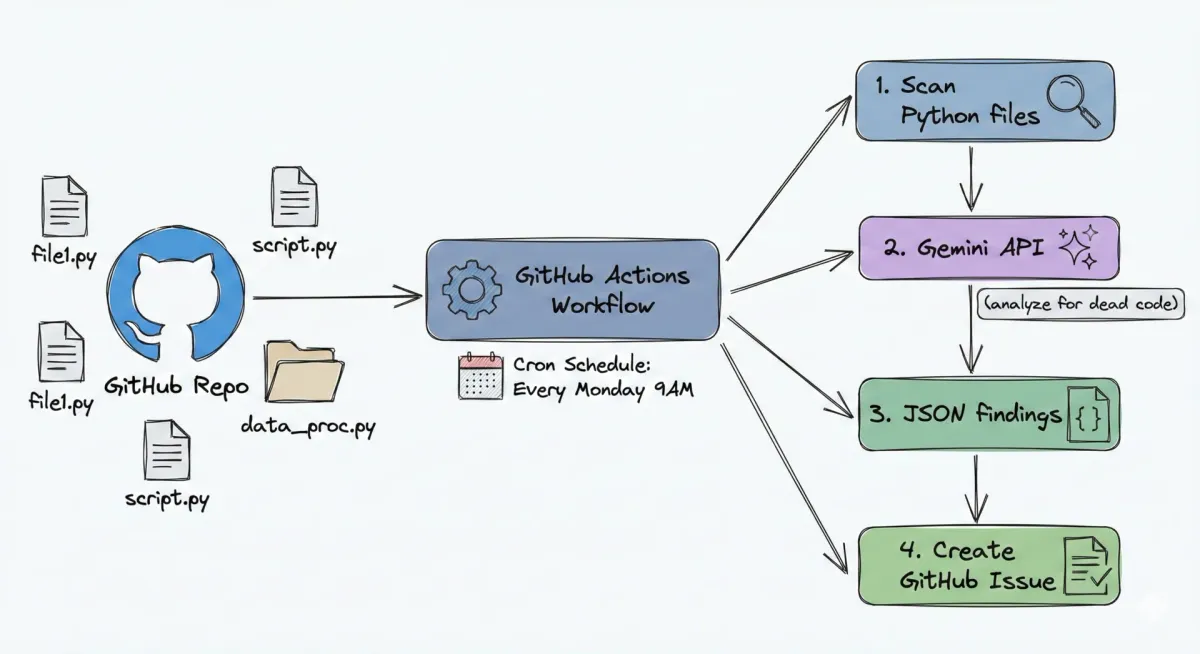
Create a scheduled GitHub Actions workflow that uses Gemini AI to detect unused functions, dead imports, and unreachable code - then reports findings as actionable GitHub Issues every Monday.
1. Create the Stale Code Detector Script
Build a Python script with file discovery, content reading, and Gemini AI integration for dead code analysis.
2. Add the Markdown Formatter
Convert Gemini findings into a structured markdown report grouped by type - unused functions, dead imports, unreachable code.
3. Build the Scheduled Workflow
Create a GitHub Actions workflow with cron scheduling that runs every Monday at 9 AM UTC.
4. Configure Automatic Issue Creation
Use the GitHub CLI in your workflow to create Issues automatically with structured findings.
5. Verify and Trigger Manually
Test the workflow with manual triggering and verify GitHub Issues are created.
Your portfolio builds as you work.
Every project documents itself as you go. Finish the work, and your proof is ready to share.
PROJECT
Real world application
Skills you'll learn
-
Python File Operations
Use pathlib for recursive file discovery and read source code with proper error handling
-
AI Dead Code Detection
Send code to Gemini API with structured prompts that return categorized JSON findings
-
Cron Scheduling
Configure weekly automated scans using cron syntax in GitHub Actions workflows
-
Markdown Report Generation
Transform raw findings into readable markdown reports grouped by issue type
-
GitHub Issue Automation
Create GitHub Issues programmatically using the gh CLI from workflow steps
-
False Positive Analysis
Understand single-file analysis limitations and interpret findings for real tech debt
Tech stack
-

GitHub Actions
CI/CD platform that runs scheduled workflows every Monday to scan your codebase automatically.
-

Gemini API
Google AI model that analyzes Python code and identifies dead code patterns with explanations.
The first Monday report flagged 12 unused functions I forgot about during a refactor. Having this run automatically means tech debt never silently accumulates again. Every team should have this.
Marcus Chen
Platform Engineer
OUTCOME
Where this leads.
Relevant Jobs
Roles where these skills matter:
- DevOps Engineer
- Platform Engineer
- Staff Engineer
- Engineering Manager
CI/CD x AI
Build production-grade automation pipelines that catch bugs, enforce quality, and deploy safely - the same workflows that power Google and Amazon engineering teams.
CI/CD x AI
Continue the JourneyFAQs
Everything you need to know
This is Part 4 of the 4-part CI/CD x AI Series. Complete Part 1: Your First GitHub Actions Workflow, Part 2: AI Code Review on Every PR, and Part 3: AI Test Generation Bot first.
The detector scans for three categories: unused functions (defined but never called), dead imports (modules imported but never used), and unreachable code (code after return statements that can never execute). Each finding includes the file path, line number, and explanation.
The detector analyzes each file individually, so functions called from test files or used dynamically via reflection may be flagged as "unused." This is a trade-off for speed and cost efficiency. Human review filters these out quickly - most teams find the majority of findings are genuine tech debt worth addressing.
Cron uses five fields: minute, hour, day of month, month, and day of week. The syntax 0 9 * * 1 means at minute 0, hour 9, any day, any month, on Monday (1). GitHub Actions supports this same cron syntax for scheduling workflows.
Yes, Google AI Studio offers a generous free tier with 1,500 requests per day. Weekly scans of typical repositories stay well within free limits - you will not incur any costs completing this NextWork project.
You have completed the entire CI/CD x AI Series! For more AI-powered automation, explore the AWS AI Security Series, the DevOps x AI Series, or the Disaster Recovery Series.

One Project. Real Skills.
45 minutes from now, you'll have completed Build an AI-Powered Stale Code Detector with GitHub Actions. No prior experience needed. Just step-by-step guidance and a real project for your portfolio.
Beginner-friendly